Starting an online store has never been easier, thanks to platforms like Shopify. With its user-friendly interface, robust features, and flexibility, Shopify has become a go-to solution for entrepreneurs and businesses looking to enter the world of e-commerce. But before you dive in, understanding the costs involved is crucial to ensure you’re choosing the right plan for your business.
From essential tools for beginners to advanced analytics for scaling businesses, Shopify offers pricing plans to suit every stage of growth. This guide will break down the costs of starting a Shopify store, highlight the features included in each plan, and help you determine which option best fits your needs. Whether you’re launching your first online store or upgrading to a more sophisticated setup, this comprehensive breakdown will provide everything you need to know about Shopify pricing.
Why Choose Shopify for Your Online Store?
Shopify is a great choice for your online store because it makes setting up and running your business easy, even if you’re not tech-savvy. It offers simple tools that let you create a professional-looking store without needing any coding skills. Shopify also provides plenty of stylish templates, so your store will look great right from the start.
Beyond its user-friendly design, Shopify has powerful features to help you manage payments, track inventory, and sell on other platforms like social media or marketplaces. As your business grows, Shopify can grow with you, offering more advanced tools as needed.
Shopify also lets you add extra features through apps, such as marketing tools or customer support options, so you can keep improving your store. With secure payment options, reliable customer support, and a platform that works whether you’re selling online or in-person, Shopify is a trusted choice to help your business succeed.
Shopify Pricing Plans Overview
When launching an online store, one of the first questions you’ll likely have is, “How much does it cost to run a Shopify store?” Shopify offers four main pricing plans designed to suit a range of business needs and budgets. Each plan comes with various features to help you manage your business effectively, from shipping discounts to inventory management and customer support. It’s important to choose the plan that best matches your goals and business scale.
Plan
Monthly Cost
Online Credit Card Rates
In-Person Credit Card Rates
Fees for Non-Shopify Payments
Basic Shopify
$29
2.9% + 30 cents
2.7%
2.0%
Shopify
$79
2.6% + 30 cents
2.5%
1.0%
Advanced Shopify
$299
2.4% + 30 cents
2.4%
0.5%
Note: Each plan comes with a free trial, so you can explore the features before committing. Choose the plan that best fits your current business needs and future growth. Additional costs apply if you choose Shopify POS Pro, which costs $89 per month.
Basic Shopify Plan
Cost: $29/month
Best For: Beginners and small businesses just starting their e-commerce journey.
Key Features:
Unlimited product uploads.
Shipping discounts (up to 64% off rates from USPS, UPS, and DHL Express).
Shopify POS Lite for accepting in-person payments.
Inventory management for up to four locations.
Integration with sales channels like social media and online marketplaces.
24/7 customer support, abandoned cart recovery, and customizable gift cards.
This plan is ideal for entrepreneurs testing the waters of e-commerce with a limited number of products.
Shopify Plan
Cost: $79/month
Best For: Growing businesses seeking advanced reporting and marketing tools.
Key Features:
All features from the Basic Shopify plan.
Inventory management for up to five locations.
Up to five staff accounts with admin access.
Higher shipping discounts (up to 72% off).
USPS Priority Mail Cubic pricing.
Professional sales reports to analyze customer behavior and improve marketing strategies.
This plan is perfect for businesses aiming to scale and optimize sales performance through detailed reporting.
Advanced Shopify Plan
Cost: $299/month
Best For: Established businesses needing advanced customization and analytics.
Key Features:
All features from the Shopify plan.
Inventory management for up to eight locations.
Up to 15 staff accounts with admin access.
Advanced report builder for creating custom analytics.
Third-party calculated shipping rates for real-time customer estimates.
For businesses managing high sales volumes and multiple locations, this plan provides the tools needed to scale efficiently.
Additional Costs to Consider
Domain Name: Purchasing a domain through Shopify costs around $14/year, or you can use third-party providers.
Themes: Free and paid themes range from $0 to $350, offering varying levels of design customization.
Apps: Add-ons for SEO, marketing, or inventory management may cost $5–$50/month per app.
Transaction Fees: Fees apply when using third-party payment gateways (0.5%–2% depending on the plan).
Marketing and Advertising: Budget for tools like Google Ads, Facebook Ads, or email campaigns.
Which Shopify Plan is Right for You?
Choose Basic Shopify if you’re new to e-commerce and selling a small number of products. This plan offers essential tools to help you get started.
Choose Shopify if you’re ready to expand your store and need professional reporting to track sales trends and optimize marketing efforts.
Choose Advanced Shopify if you need advanced analytics, calculated shipping rates, and support for managing multiple locations or high sales volumes.
Conclusion
Understanding Shopify’s pricing structure is essential when making informed decisions about launching your online store. With a variety of plans tailored to different business needs and budgets, Shopify ensures that there’s an option that’s perfect for both newcomers and seasoned entrepreneurs. Whether you’re just starting or looking to scale an established business, Shopify provides the flexibility to grow with you. The free trial is a great opportunity to explore the platform’s robust features and test out the plan that best aligns with your goals and objectives.
Building your e-commerce store with Shopify is only the first step in your journey to online success. As you continue to grow, Shopify’s tools will help streamline your operations, enhance customer experiences, and maximize profitability.
If you’re looking for expert support along the way, The Sun Media House is here to assist. Our team specializes in web development, digital marketing, and custom solutions to help you not only create an online store but also optimize and grow it for long-term success. From design to marketing, we’re committed to helping your business thrive in the digital marketplace.
Contact us today to learn more about how we can help you get the most out of your Shopify store!
As an expert web designer, I can tell you that the design of your website is one of the most important factors in determining your online success. In fact, your website is often the first impression potential customers will have of your business. If your site is difficult to navigate, slow to load, or doesn’t look professional, you could lose their trust before they even have a chance to learn about your services or products.
A well-designed website, on the other hand, creates a positive experience for your visitors. It helps them find what they need quickly and easily, builds trust in your brand, and encourages them to stay longer. Good design also plays a key role in improving your search engine ranking, driving traffic to your site, and ultimately converting visitors into customers.
In this article, I’ll Walk you through why website design matters so much and how it can affect everything from user experience to your business’s bottom line. Whether you’re building a new site or refreshing your current one, understanding the importance of design will help you create a site that supports your business goals and leaves a lasting impression.
What is Website Design
Website design is the process of planning, creating, and organizing the elements that make up a website. It involves a combination of graphic design, user interface (UI) design, and user experience (UX) design, all working together to create a visually appealing, functional, and easy-to-navigate website. The goal of website design is to ensure that visitors have a positive experience while browsing the site and that they can easily find the information or services they need.
Key elements of website design include:
Layout: How the content is structured and arranged on the page, ensuring it is visually appealing and easy to follow.
Color Scheme: The choice of colors that represent the brand and create a visually harmonious experience for users.
Typography: The selection of fonts that make the content readable and align with the site’s tone and branding.
Images and Graphics: The use of photos, icons, illustrations, and other visuals to enhance the content and make the site more engaging.
Navigation: The menus, buttons, and links that allow users to easily find their way around the website.
Responsiveness: Ensuring that the website is mobile-friendly and looks good on all devices, from desktops to smartphones.
Performance and Speed: Designing a site that loads quickly and performs efficiently, contributing to a better user experience.
SEO: Integrating design elements that help search engines index and rank the site higher, such as clean coding and optimized images.
Accessibility: Ensuring that your website is accessible for everyone is important, everything from image alt text to description for a table.
Ultimately, good website design combines aesthetic appeal with functionality, ensuring that visitors can easily interact with the site and accomplish their goals, whether that’s making a purchase, contacting the business, or simply exploring the content.
What is the Difference Between Website Design and Website Development?
When creating a website, two key roles come into play: website design and website development. While these two processes are deeply interconnected, they focus on different aspects of a website’s creation. Website design is all about the visual elements and user experience, ensuring that the website is appealing, easy to navigate, and aligned with the brand. Website development, on the other hand, focuses on the technical side, turning the design into a fully functional website by writing code and integrating features.
Understanding the difference between these two areas can help you better appreciate the complex process of building a website and how each part contributes to its overall success. Below is a breakdown of the key differences between website design and development.
Aspect
Website Design
Website Development
Focus
Visual appearance and user experience.
Functionality, performance, and technical implementation.
Key Responsibilities
Creating the layout, color scheme, typography, and visuals.
Coding the website, integrating features, and optimizing performance.
Primary Goal
Make the website look appealing and easy to use.
Make the website work smoothly, ensuring functionality and interactivity.
Skills Required
Graphic design, UI/UX design, branding, color theory.
A working, functional website with all features implemented.
User Interaction
Focuses on how users experience the website visually and interactively.
Focuses on how the website operates, including load times, responsiveness, and features.
Examples
Color schemes, layout structure, navigation menus, icons.
Database setup, website security, server configurations.
Both website design and website development are essential for creating a successful online presence. A great website needs to look visually appealing (design) and work flawlessly (development). Together, they form the backbone of any effective website.
Why Web Design Is Important
Web design is more than just creating a visually appealing website; it’s about building an experience that captures the attention of users, keeps them engaged, and drives them toward specific actions. In the digital era, your website often serves as the face of your business, making its design a crucial factor in your overall success.
First Impressions Matter
In the digital world, your website is often the first interaction potential customers have with your business. Within seconds of landing on your site, visitors form an opinion about your brand, and that opinion is heavily influenced by your website’s design. A clean, modern, and professional design creates a positive first impression, making visitors more likely to trust your business and engage with your content.
On the other hand, a poorly designed, outdated, or cluttered website can quickly turn visitors away. It gives the impression that your business may lack professionalism, attention to detail, or credibility. With so many options available online, users won’t hesitate to leave a site that doesn’t immediately meet their expectations.
A strong first impression sets the tone for a visitor’s entire experience on your site. By investing in quality web design, you show users that you value their time and are committed to providing a professional and trustworthy experience.
Builds Credibility and Trust
Your website serves as the digital face of your business, and its design plays a critical role in building credibility and trust with your audience. A professional, well-designed website signals that your business is reliable, detail-oriented, and committed to providing a high-quality experience.
Visitors are more likely to trust a website that looks polished, is easy to navigate, and presents information clearly. Elements like consistent branding, readable fonts, high-quality images, and clear calls-to-action show that your business is serious and trustworthy. On the flip side, a cluttered, outdated, or poorly designed site can make users question your legitimacy, professionalism, and ability to deliver on promises.
A well-crafted design also reduces user frustration by offering intuitive navigation and quick access to important information. This positive experience fosters confidence in your brand and encourages users to engage further, whether that means exploring your products, filling out a contact form, or making a purchase.
In today’s competitive market, credibility and trust are essential for building lasting relationships with customers, and a thoughtfully designed website lays the foundation for that trust.
Enhances User Experience (UX)
User experience (UX) is at the heart of a successful website, and good web design is key to making sure visitors have a seamless and enjoyable interaction with your site. Enhancing UX means creating a website that is intuitive, easy to navigate, and designed with the user’s needs in mind.
A well-designed website ensures that visitors can quickly find the information they are looking for without confusion or frustration. Elements such as clear navigation menus, logical page layouts, and responsive design all contribute to a positive experience. When users feel comfortable exploring your site, they are more likely to stay longer, interact with your content, and complete desired actions, such as making a purchase or submitting an inquiry.
Boosts Search Engine Optimization (SEO)
Web design plays a crucial role in improving your website’s search engine optimization (SEO), making it easier for potential customers to find you online. A well-designed website ensures that both users and search engines can navigate and understand your site effectively.
Key elements of web design that impact SEO include:
Mobile-Friendliness: With search engines prioritizing mobile-first indexing, responsive design is essential. A mobile-friendly website adapts seamlessly to different screen sizes, improving rankings and user satisfaction.
Fast Load Times: Page speed is a critical ranking factor. Websites designed with optimized images, clean code, and efficient layouts load faster, enhancing both user experience and SEO performance.
Clean Site Structure: A clear, logical site structure makes it easy for search engines to crawl and index your pages. Organized menus, internal linking, and proper use of headings (H1, H2, etc.) help search engines understand the hierarchy of your content.
Optimized Visuals and Alt Text: High-quality images and videos, when optimized correctly, not only enhance visual appeal but also improve SEO. Adding descriptive alt text to images ensures better accessibility and helps search engines index your media.
User Engagement Metrics: Good design keeps visitors on your site longer by offering an intuitive and enjoyable experience. Lower bounce rates and higher engagement signal to search engines that your website is relevant and valuable, improving your ranking.
Increases Conversion Rates
Web design plays a critical role in turning visitors into customers by creating a seamless and engaging experience that encourages action. A well-designed website uses clear and strategically placed calls-to-action (CTAs), such as “Buy Now” or “Contact Us,” to guide users toward their next step. Intuitive navigation ensures visitors can easily find the information they need, reducing frustration and keeping them engaged. Mobile optimization is equally important, as a responsive design ensures the site performs well across all devices, maximizing conversions from both desktop and mobile users.
Fast load times are another essential factor, as a slow website can drive users away. A website that loads quickly keeps visitors on the page and increases the likelihood of them completing desired actions. Additionally, trust-building elements, such as testimonials, reviews, trust badges, and secure payment options, help establish credibility and make users more comfortable with your brand. High-quality visuals and modern design elements further enhance the website’s appeal, making it more engaging and professional.
Sets You Apart from Competitors
In today’s crowded digital landscape, standing out is essential, and your website design can be a key differentiator. A unique, visually appealing, and professionally designed website immediately grabs attention and leaves a lasting impression on visitors. It reflects your brand’s personality, values, and professionalism, showcasing what makes your business special.
A well-designed website helps you rise above competitors with outdated, cluttered, or generic designs. Elements like custom graphics, consistent branding, and engaging content make your website memorable and reinforce your business identity. Additionally, a modern design signals innovation and forward-thinking, positioning your brand as a leader in your industry.
By providing a seamless user experience, clear navigation, and responsive design, your website not only attracts users but keeps them coming back. This competitive edge fosters trust and loyalty among your audience, making your business their first choice. In essence, a strong web design is a powerful tool that sets your brand apart and leaves your competition in the rearview.
The Impact of Poor Web Design
Your website is often the first thing people see about your business, and poor design can leave a bad impression right away. Imagine visiting a website that’s slow, hard to navigate, or looks outdated. You would probably leave quickly, right? That’s exactly what happens to your visitors when your website design isn’t up to par.
A cluttered layout or confusing navigation can frustrate users and make them question if they can trust your business. If your site doesn’t work well on mobile devices or takes too long to load, visitors are likely to leave and go to a competitor’s site instead. This leads to missed opportunities, fewer sales, and a poor reputation.
Bad design also hurts your visibility. Search engines like Google rank websites lower if they load slowly or aren’t user-friendly. This makes it harder for potential customers to find you online.
A poorly designed website can drive people away, damage your credibility, and even hurt your business growth. On the other hand, investing in good design helps you attract and keep visitors, build trust, and stand out from the competition. It’s the difference between losing customers and winning them over.
Web Accessibility: An Essential Part of Website Design
Web accessibility is a critical component of modern website design, ensuring that people of all abilities can access, navigate, and engage with your site. It involves designing websites to be inclusive for everyone, including individuals with visual, auditory, motor, or cognitive disabilities.
Accessible design means incorporating features like keyboard-friendly navigation, compatibility with screen readers, descriptive alt text for images, and clear, easy-to-read content. These elements not only make your site more usable for individuals with disabilities but also improve the overall user experience for all visitors.
Accessibility is more than just a legal requirement; it’s a reflection of your brand’s values and commitment to inclusivity. Moreover, accessible websites often perform better in search engine rankings and reach a broader audience.
Create an Accessible Website with Us
At The Sun Media House, we prioritize accessibility as a fundamental aspect of web design. Our team ensures your website is inclusive, compliant, and optimized to serve all users effectively. Reach out today to make your website a space where everyone can engage seamlessly.
Final Words
A well-designed website is more than just a digital presence; it’s a powerful tool that helps you connect with your audience, build trust, and stand out from the competition. Whether it’s enhancing user experience, boosting conversions, or improving your brand’s credibility, the design of your website plays a key role in your business’s success. On the other hand, poor design can drive potential customers away and harm your reputation.
If you’re looking to create or improve your website, make sure you partner with experts who understand the importance of good design. The Sun Media House specializes in creating stunning, user-friendly websites that not only look great but also deliver results. Contact us today to start building a website that will make a lasting impression and drive your business forward.

In today’s digital world, having a website is essential for small businesses. It is no longer just an option but a vital tool for growth and success. Whether you run a local café, provide freelance services, or manage an online store, your website serves as the foundation of your online presence. Research shows that 81 percent of consumers look up businesses online before making a purchase or hiring a service. Without a website, your business risks losing visibility and potential customers to competitors.
A website not only establishes credibility and trust but also works as a 24/7 platform for customers to learn about your business, interact with your services, and make purchases. In this article, we will discuss why having a website is critical for small businesses and how it can drive growth and success in today’s competitive market.
The Role of a Website in Business Success
A website plays a pivotal role in the success of a small business by serving as its digital foundation. It is more than just an online presence; it is a tool that enhances visibility, builds trust, and drives growth. Let’s explore how a website contributes to business success.
1. Establishes Credibility
A professional website is one of the most effective ways to establish credibility for your small business. In today’s digital age, customers expect businesses to have an online presence, and a well-designed website acts as proof that your business is legitimate and trustworthy. It gives you the opportunity to showcase your expertise, share customer testimonials, and provide clear information about your products or services.
A website also helps position your business as a professional and reliable choice in your industry. Whether you’re a local shop or a growing service provider, having a website shows that you are serious about your business and committed to serving your customers. Without one, potential clients may question your credibility or choose competitors who have an established online presence.
2. Acts as a 24/7 Salesperson
A website works like a salesperson that never takes a break. It stays open 24 hours a day, 7 days a week, allowing customers to learn about your business, products, or services whenever it is convenient for them. Whether it’s during the day, late at night, or on weekends, people can visit your website and get the information they need.
With features like product descriptions, contact forms, and FAQs, your website helps customers make decisions without needing you to be there. It answers questions, promotes what you offer, and even generates sales or leads while you focus on other tasks. This makes your website an essential tool for keeping your business active and accessible at all times.
3. Central Hub for Your Online Presence
Your website serves as the central hub for all your online activities. It brings together everything about your business in one place, including your products, services, contact information, and customer reviews. While social media platforms and online directories are useful, they are not a substitute for a website. A website allows you to control your message, design, and content, ensuring visitors see exactly what you want them to.
All your other online efforts, such as social media posts, email campaigns, or ads, can link back to your website. This gives potential customers a place to learn more about your business, explore your offerings, and take action, like making a purchase or contacting you. By acting as the center of your online presence, your website ties all your marketing efforts together to help your business grow.
Benefits of a Website for Small Businesses
A website is one of the most valuable assets a small business can have. It not only provides a platform to showcase your products or services but also helps build trust, attract customers, and streamline operations. Here are some key benefits a website offers to small businesses:
1. Reaches a Broader Audience
A website helps your business connect with a much larger audience than traditional methods alone. Unlike a physical store that serves people in a specific location, a website allows you to reach customers locally, nationally, or even globally. Anyone with internet access can find your business, learn about your offerings, and contact you, no matter where they are.
Having a website also ensures your business appears in online searches, helping you attract customers who are actively looking for products or services like yours. By breaking geographical barriers, your website opens up new opportunities to grow your audience and expand your business reach.
2. Cost-Effective Marketing Tool
A website is one of the most cost-effective marketing tools for small businesses. Compared to traditional advertising methods like print, radio, or TV ads, a website is far more affordable and offers long-term value. Once your website is set up, it can continually promote your business without recurring high costs.
With features like blogs, product pages, and customer testimonials, your website can showcase your offerings and attract new customers. You can also use tools like SEO (Search Engine Optimization) to improve your visibility on search engines, bringing in more visitors without spending a fortune. For small businesses looking to market effectively on a budget, a website is a smart and lasting investment.
3. Improves Customer Engagement
A website makes it easier for businesses to connect and engage with customers. It provides a space where visitors can learn about your products, services, and updates at their own pace. Features like contact forms, chat options, and FAQs allow customers to ask questions, get answers, and interact with your business quickly and conveniently.
By adding blogs, testimonials, and helpful resources, your website can also keep customers informed and interested. This not only builds trust but encourages them to return for more information or make a purchase. A well-designed website makes communication simple, improving customer satisfaction and strengthening relationships.
4. Builds Trust Through Social Proof
A website helps build trust by showcasing social proof, such as customer reviews, testimonials, and success stories. When potential customers see positive feedback from others who have used your products or services, it reassures them that your business is reliable and delivers value.
You can also display case studies, ratings, and even logos of well-known clients or partners on your website. These elements show visitors that others trust your business, making them more likely to trust you too. By sharing real experiences and results, your website becomes a powerful tool for building credibility and winning over new customers.
5. Supports Local SEO Efforts
A website plays a key role in helping your business appear in local search results. Local SEO (Search Engine Optimization) focuses on optimizing your website so that people in your area can easily find you when searching for products or services online. For example, if someone searches for “best bakery near me” or “plumber in [city],” a well-optimized website can help your business show up on search engines like Google.
By including important details such as your location, business hours, and contact information, your website makes it easier for local customers to find and reach you. Adding blogs, customer reviews, and relevant keywords further boosts your local visibility. With strong local SEO, your website connects you to nearby customers who are ready to do business.
6. Provides Insights and Analytics
A website allows you to gather valuable insights about your customers through tools like Google Analytics. You can track important information, such as how many people visit your site, where they come from, which pages they view the most, and how long they stay. This data helps you understand your audience better and identify what works and what needs improvement.
By analyzing these insights, you can make smarter decisions to improve your website, refine your marketing strategies, and enhance the customer experience. For example, you can see which products attract the most attention or which blog posts bring in the most visitors. This knowledge empowers you to grow your business more effectively by focusing on what your customers truly want.
7. Increases Sales Opportunities
A website can significantly increase your sales opportunities by providing customers with a seamless way to browse and purchase your products or services online. Whether you have an e-commerce store, an appointment booking system, or a contact form for inquiries, your website makes it easy for potential customers to take the next step toward making a purchase.
Additionally, features like clear calls-to-action, special promotions, and lead capture forms encourage visitors to engage with your business and convert into paying customers. By making your offerings accessible online, you can reach a wider audience and create more chances for sales, ultimately boosting your revenue.
Key Features Every Small Business Website Should Have
To make your website effective, it should include the following:
Mobile-Friendly Design: With over half of internet traffic coming from mobile devices, a responsive design ensures your site looks great and works seamlessly on any device.
Clear Call-to-Actions (CTAs): Direct your visitors with actions like “Buy Now,” “Contact Us,” or “Schedule a Consultation.”
About Us Section: Build trust by sharing your story, mission, and team information.
Testimonials and Reviews: Showcase customer feedback to establish social proof and build confidence in your offerings.
SEO Optimization: Ensure your website is optimized for search engines so customers can find you easily.
Why Your Small Business Needs a Website
Many small business owners hesitate to create a website because they worry about the cost, complexity, or time commitment. However, these concerns are often based on misconceptions. In today’s digital age, building and maintaining a website is both affordable and simple. Platforms like WordPress, Wix, and Squarespace offer easy-to-use tools, allowing you to create a professional website even without technical expertise.
A website is much more than an online brochure. It’s a 24/7 digital storefront that gives you complete control over how your business is presented. Unlike social media platforms, where visibility depends on algorithms and external rules, your website is a space you own and control. This makes it easier to build credibility, share information, and provide a seamless experience for potential customers.
Whether you’re a small local business or an online entrepreneur, having a website helps you reach more people, grow your customer base, and compete in the digital world. It’s an essential tool that allows you to showcase your services, share customer testimonials, and increase your visibility, all while offering a professional look that builds trust.
If you’re ready to take your business to the next level, The Sun Media House is here to help. We specialize in creating custom websites tailored to your specific needs. Let us guide you in building a strong digital presence that will drive growth and success. Contact us today to get started!
Conclusion
In today’s digital world, a website is essential for small businesses to remain competitive and visible. It serves as the foundation for your online presence, enabling you to reach a larger audience, showcase your products or services, and build trust with potential customers. A well-designed website allows you to operate 24/7, giving customers the ability to learn about your business and make purchases or inquiries at their convenience. It also helps strengthen your brand’s credibility by providing a professional platform where customers can easily access information about your offerings.
Having a website also provides valuable insights into customer behavior, which can inform your marketing strategies and improve customer engagement. Whether you’re a local business or an online retailer, a website enables you to stay ahead of the competition by increasing your visibility, promoting your brand, and driving sales. In the long run, investing in a website is an investment in the growth and success of your business, providing the tools you need to thrive in the digital age.
In a digital-first world, brand trust is everything. It’s the invisible bridge that connects your business to your customers, turning casual visitors into loyal advocates. Unlike traditional storefronts where personal interactions build relationships, online businesses must rely on other methods to establish credibility and win customer confidence.
Building trust online isn’t just a nice-to-have; it’s essential. Studies show that consumers are more likely to engage with brands they perceive as trustworthy, with trust playing a critical role in driving repeat business and word-of-mouth referrals. Without it, even the most well-designed websites or innovative products may struggle to succeed.
This guide will walk you through proven strategies to establish and strengthen your brand trust online, helping you build meaningful relationships with your audience and set your business apart in an increasingly competitive landscape.
Why Brand Trust is Crucial Online
Trust is the foundation of any successful online business. When people shop online, they cannot touch, feel, or see your products in person. Instead, they rely on your brand’s reputation to decide if you are worth their time and money. Without trust, customers will hesitate to buy from you. But when they trust your brand, they are more likely to return and recommend you to others.
Building trust online can be challenging. Customers worry about issues like poor product quality, hidden fees, or even being scammed. With data breaches and privacy concerns making headlines, consumers are more cautious than ever. Brands like Amazon have built trust by being transparent, reliable, and focused on customer satisfaction. On the other hand, businesses that fail to meet customer expectations or protect data quickly lose credibility.
Trust is not just a nice addition; it is essential for success in the digital world. A trustworthy brand attracts loyal customers who are happy to buy from you and spread the word about your business.
Key Strategies to Build Brand Trust Online
Building trust online requires a thoughtful approach that prioritizes transparency, consistency, and customer satisfaction. Here are some effective strategies to strengthen your brand’s credibility in the digital space:
Create a Professional Online Presence
Your website is often the first impression customers have of your business. Make sure it reflects your brand’s professionalism. A clean, user-friendly design, clear navigation, and mobile compatibility are essential. Include detailed contact information, an “About Us” page, and an FAQ section to show customers you are accessible and transparent.
Be Transparent and Authentic
Customers value honesty and integrity. Share your brand’s story, mission, and values openly. Be upfront about product pricing, return policies, and shipping details. If mistakes happen, acknowledge them and explain how you will make things right. Authenticity helps humanize your brand and builds trust.
Leverage Social Proof
Social proof reassures customers that others trust your brand. Showcase customer reviews, testimonials, and success stories on your website and social media. Collaborate with credible influencers who align with your values to further validate your brand. Highlight any awards, certifications, or partnerships that add to your credibility.
Offer Exceptional Customer Support
Reliable and responsive customer support shows customers that you care about their experience. Provide multiple support channels, such as live chat, email, and phone. Address inquiries promptly and resolve complaints professionally. A dedicated FAQ section can help customers find answers quickly and reduce frustration.
Prioritize Security and Privacy
With increasing concerns about online data security, protecting customer information is critical. Use SSL certificates for your website, offer secure payment methods, and communicate your privacy policies clearly. Display trust badges and security certifications to reassure customers that their data is safe with you.
Share Valuable and Consistent Content
Content is a powerful tool for building trust. Share blogs, videos, and guides that educate your audience and showcase your expertise. Ensure your content is consistent in tone and aligns with your brand values. Engaging regularly on social media helps keep your brand visible and builds familiarity with your audience.
Deliver on Your Promises
Consistency in delivering what you promise is crucial. Whether it is product quality, shipping timelines, or customer service, it ensures you meet or exceed expectations. Positive experiences build trust, while broken promises can quickly erode it.
Mistakes to Avoid When Building Brand Trust Online
While building brand trust online is essential, even small missteps can harm your reputation. Avoid these common mistakes to maintain credibility and foster stronger relationships with your customers:
Overpromising and Underdelivering
Making big claims that you cannot back up is a quick way to lose trust. Whether it is unrealistic delivery times or exaggerated product benefits, failing to meet expectations disappoints customers and damages your reputation. Always be honest and transparent about what you can deliver.
Ignoring Customer Feedback
Not responding to reviews, questions, or complaints can make customers feel undervalued. Ignored feedback, especially negative reviews, may leave an impression that you do not care about improving or addressing concerns. Take the time to engage with your audience and show them their opinions matter.
Inconsistent Branding
A mismatch in your branding, such as different logos, colors, or messaging across platforms, can confuse customers and make your business appear unprofessional. Consistency builds recognition and trust, so ensure your brand elements are aligned everywhere you are present online.
Failing to Protect Customer Data
In today’s digital age, customers are more concerned than ever about their data privacy. A lack of visible security measures or unclear privacy policies can make customers hesitant to trust your brand. Always prioritize data protection and communicate how you safeguard their information.
Avoiding Accountability
Mistakes happen, but failing to own up to them can erode trust quickly. Whether it is a delayed shipment, a product defect, or a technical glitch, address issues promptly and professionally. Apologize when necessary and outline how you will prevent similar problems in the future.
Posting Irregular or Low-Quality Content
An inactive social media presence or poorly crafted content can make your brand seem untrustworthy or outdated. Regularly post high-quality, relevant content that reflects your expertise and commitment to your audience.
Overlooking Social Proof
Neglecting to showcase customer reviews, testimonials, or success stories can leave potential customers questioning your credibility. People trust peer recommendations, so make sure to highlight positive feedback and success stories.
Tools and Resources to Help Build Trust
The right tools make building trust online easier. Here are some essentials:
Customer Reviews: Use platforms like Trustpilot, Google Reviews, and Yelp to showcase positive feedback and build credibility.
Website Security: Protect customer data with SSL certificates (e.g., Let’s Encrypt) and trust badges like McAfee Secure.
Social media: Manage and engage with tools like Hootsuite or Sprout Social and create branded visuals using Canva.
Customer Support: Offer fast help with Zendesk, Intercom, or Freshdesk for live chat and ticketing.
Content Creation: Build authority with HubSpot, Grammarly for polished writing, and AnswerThePublic for popular questions.
Analytics: Track performance with Google Analytics, Hotjar for user insights, and Brand24 for monitoring online mentions.
Conclusion
Establishing trust online is not a one-time effort but an ongoing process that requires transparency, consistency, and a customer-first approach. By creating a professional online presence, delivering on promises, and prioritizing security and customer satisfaction, you can build lasting relationships with your audience. Avoid common pitfalls like overpromising or ignoring feedback and use tools to enhance your credibility and streamline your efforts.
Trust is the foundation of loyalty and long-term success in the digital world. When customers believe in your brand, they are more likely to engage, recommend, and return. With the right strategies, you can turn trust into your greatest competitive advantage.
Google has just launched its November 2024 Core Update, which is a change to how Google ranks websites in search results. These updates help ensure that the search results we see are useful, trustworthy, and relevant to our needs. This particular update affects websites across all regions and languages, which means your site might see changes in its search rankings.
In a post on X (formerly Twitter), Google announced this update, emphasizing that it’s part of an ongoing effort to improve how Google evaluates content quality. If you notice a drop or rise in your site’s ranking, Google advises waiting until the update is fully rolled out (which usually takes about two weeks) before making any big changes. Then, it’s best to check your traffic and look at how your content might be improved in quality, relevance, or user experience.
Official Announcement from Google
Google officially announced the release of its November 2024 Core Update on November 11, 2024, via their Google Search Central account on X (formerly Twitter). The update was described as a part of their ongoing efforts to enhance search quality. Google noted:
“Today we released the November 2024 core update. We’ll add it to our ranking release history page in the near future and update it when the rollout is complete.”
Core updates are significant changes to Google’s search algorithm that influence how content is assessed and ranked. Unlike specific updates that target particular aspects of SEO (such as product reviews or spam detection), core updates impact all websites. These updates are intended to improve the overall search experience by refining how Google evaluates content quality, relevance, and authority.
What Site Owners Should Know
Most websites will likely not notice dramatic changes immediately. However, if you experience noticeable ranking shifts or traffic fluctuations, Google suggests taking the following steps:
Wait for the Rollout to Finish: Google recommends waiting until the update is fully rolled out before making any assessments. Early fluctuations might not reflect the final impact.
Analyze Performance in Search Console: Compare pre- and post-update traffic and ranking data. Pay special attention to pages that see substantial drops (over 20 positions) as these might be most affected by the new ranking criteria.
Focus on Content Quality: Evaluate and improve content using Google’s self-assessment guidelines, which emphasize quality, originality, and value to readers. Google suggests avoiding quick fixes and instead focusing on long-term, sustainable improvements to content and user experience.
Google’s Recommendations for Recovery
If you find your website’s rankings impacted, be aware that recovery may take time. Google advises site owners to avoid drastic changes and instead focus on understanding where improvements can be made. Recovery often occurs over several months as Google’s systems reassess and validate the adjustments made to the site. Google stresses that adapting to user expectations and producing high-quality, useful content are the best ways to remain resilient amid changes.
In today’s digital age, software security is more essential than ever, particularly for applications that underpin critical infrastructure or support national critical functions (NCFs). Recognizing this, the Cybersecurity and Infrastructure Security Agency (CISA), alongside the FBI, developed the Secure by Design initiative to encourage software manufacturers to prioritize security from the very beginning of the software development process. By following this guidance, manufacturers not only protect their own interests but also demonstrate a commitment to their customers’ security outcomes.
Understanding the Secure by Design Framework
The Secure by Design framework aims to assist software manufacturers in embedding security best practices from the outset. Although the guidance is voluntary, it offers actionable recommendations that enhance a software’s resilience against cyber threats. This is particularly important for software supporting critical infrastructure, as vulnerabilities in these systems can have widespread implications on national security, economic stability, and public safety.
CISA’s guidance addresses three main categories of product security bad practices that manufacturers should avoid:
Product Properties – Observable security-related attributes of software products.
Security Features – Core functionalities that contribute to a secure environment.
Organizational Processes and Policies – Internal practices and standards that promote security transparency.
By following the recommended practices within these categories, software manufacturers can mitigate significant security risks associated with their products.
Key Product Properties to Enhance Security
Avoid Memory-Unsafe Languages: Developing software for critical infrastructure in memory-unsafe languages (like C or C++) without a strategy for mitigating memory-related vulnerabilities elevates risk. Manufacturers are urged to either transition to memory-safe languages or publish a roadmap by January 1, 2026, detailing steps for enhancing memory safety in existing products.
Mitigate SQL Injection Risks: The inclusion of user-provided input directly in SQL queries can lead to SQL injection vulnerabilities. Software should enforce the use of parameterized queries to systematically prevent these attacks.
Prevent Command Injection Vulnerabilities: Allowing user-provided input in operating system commands without proper delineation poses a risk. Manufacturers should adopt practices that prevent command injections to safeguard critical systems.
Eliminate Default Passwords: Default passwords, especially those shared across products, are a significant vulnerability. Manufacturers should implement random, unique passwords for each instance or require users to set strong passwords during installation to enhance security.
Address Known Vulnerabilities: Releasing software with known vulnerabilities listed in CISA’s Known Exploited Vulnerabilities (KEV) Catalog significantly elevates risk. Software manufacturers are advised to patch these vulnerabilities before product release and to respond to new KEV disclosures with timely patches to protect users.
Secure Open-Source Software Dependencies: Integrating open-source software with known vulnerabilities can create critical security risks. Manufacturers should maintain a software bill of materials (SBOM) for their dependencies and follow strict security measures to evaluate and update these dependencies.
Essential Security Features for Robust Software Design
Implement Multi-Factor Authentication (MFA): Lack of MFA support, especially for software used in critical infrastructure, exposes systems to unauthorized access risks. Manufacturers should ensure that MFA is supported and enabled by default for administrator accounts by January 1, 2026.
Enable Intrusion Detection Capabilities: Products should provide customers with logs and artifacts to detect signs of intrusion. For cloud and SaaS products, logs should be retained for at least six months at no additional charge, allowing organizations to monitor for potential security breaches effectively.
Strengthening Organizational Processes and Policies
Publish Timely CVEs: Failing to disclose Common Vulnerabilities and Exposures (CVEs) promptly for critical or high-impact vulnerabilities weakens customer trust. CISA recommends publishing timely CVEs, complete with Common Weakness Enumeration (CWE) data, for transparency and security.
Establish a Vulnerability Disclosure Policy (VDP): A VDP encourages external parties to report vulnerabilities responsibly without fearing legal repercussions. This policy should authorize testing by the public, provide a reporting channel, and adhere to coordinated disclosure best practices.
Why Secure by Design Matters for Today’s Software Landscape
The rapid expansion of digital systems supporting critical infrastructure means that vulnerabilities in one system can have cascading effects. CISA’s Secure by Design guidance is a proactive approach, urging manufacturers to build security into their development processes to prevent risks rather than react to them. By adopting Secure by Design practices, software manufacturers send a clear message: they are committed to protecting not only their own interests but also the public’s safety, security, and well-being.
The Secure by Design initiative isn’t about enforcing regulations but offering a robust framework for manufacturers to voluntarily elevate their security standards. Following these best practices will help create a digital environment where security is woven into the fabric of every product, ultimately contributing to a safer, more resilient infrastructure for all.
Final Thoughts
Incorporating security into the very fabric of software development, especially for critical infrastructure, is a powerful step toward safeguarding the essential systems that drive our society. CISA’s Secure by Design initiative empowers software manufacturers to proactively enhance security, prevent vulnerabilities, and foster public trust in their products. By embracing Secure by Design principles, manufacturers can make a significant impact on national security and create a safer digital ecosystem for everyone.
If you’re ready to elevate the security of your software products, The Sun Media House can help. Our expert team understands the importance of Secure by Design and works alongside software manufacturers to embed robust security practices from day one. Let us support you in developing software that not only meets but exceeds industry security standards.
Contact The Sun Media House today to learn how we can assist you in creating secure, resilient software that meets the highest standards for critical infrastructure. Together, let’s shape a safer digital future.
If you want your blog to reach more readers, using the right keywords is essential. Keywords are the terms people type into search engines when looking for information. They help your content show up in search results, making it easier for your target audience to find you.
SEMrush is a powerful tool that makes finding and analyzing keywords easy. Whether you’re new to blogging or have been writing for a while, SEMrush can help you discover keywords that will drive traffic to your blog and improve your search rankings.
In this guide, we’ll show you how to use SEMrush to find the best keywords for your business blog. You’ll learn how to analyze competitors, explore related keywords, and build a list of valuable terms that can enhance your content. Let’s get started!
Understanding the Basics of Keywords
Keywords are the words and phrases that users enter into search engines when looking for information. They play a crucial role in helping your blog content reach the right audience. Understanding the different types of keywords and their significance can greatly improve your content strategy.
What Are Keywords?
Keywords are the bridge between what people are searching for and the content you create. By incorporating relevant keywords into your blog, you increase the chances of your articles appearing in search results.
Short-Tail vs. Long-Tail Keywords
Short-Tail Keywords: These are general keywords that typically consist of one or two words (e.g., “marketing” or “shoes”). They tend to have high search volumes but are also highly competitive, making it difficult to rank for them.
Long-Tail Keywords: These are more specific phrases that usually consist of three or more words (e.g., “best marketing strategies for small businesses” or “comfortable running shoes for flat feet”). Although they have lower search volumes, long-tail keywords often lead to higher conversion rates, as they target users with specific needs or intentions.
Why Keywords Matter
Using the right keywords in your blog helps search engines understand what your content is about, making it more likely to be displayed to users searching for those terms. Effective keyword research can lead to increased organic traffic, better engagement, and improved rankings in search results.
Setting Up Your SEMrush Account
To begin using SEMrush, you’ll first need to set up an account. Here’s how:
Visit the SEMrush website and click on the “Sign Up” button.
Choose a pricing plan that suits your needs (SEMrush offers a free trial for new users).
Complete the registration process by providing your email address and creating a password. Once your account is set up, you’ll be ready to start your keyword research journey.
Finding Keywords with the Keyword Overview Tool
The Keyword Overview tool in SEMrush is a great starting point for your keyword research. Here’s how to use it:
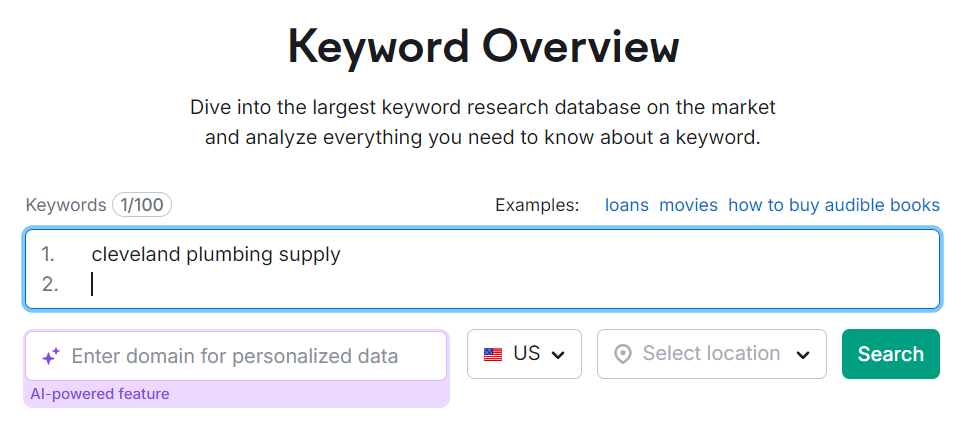
Log in to your SEMrush account and navigate to the “Keyword Overview” tool.
Enter a keyword or phrase relevant to your business in the search bar.
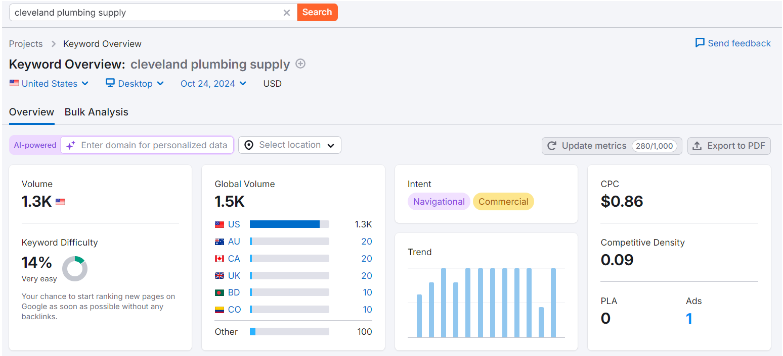
Analyze the results: You’ll see important metrics, including: ->Search Volume: The average number of times users search for this keyword each month. ->Keyword Difficulty: A percentage indicating how difficult it is to rank for this keyword. ->CPC (Cost Per Click): The average cost advertisers pay for clicks on ads targeting this keyword.
These metrics will help you gauge the potential of each keyword for your blog.
Exploring Related Keywords
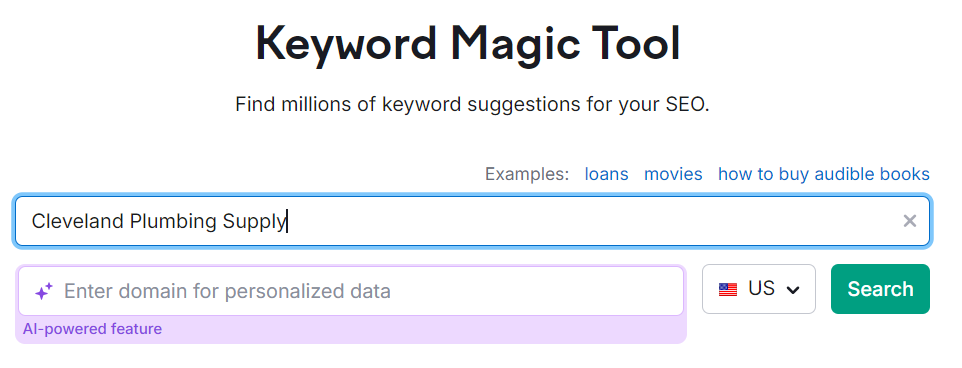
To find additional keyword opportunities, use the Keyword Magic Tool in SEMrush. Here’s how:
Access the Keyword Magic Tool from the main dashboard.
Enter your seed keyword into the search bar.
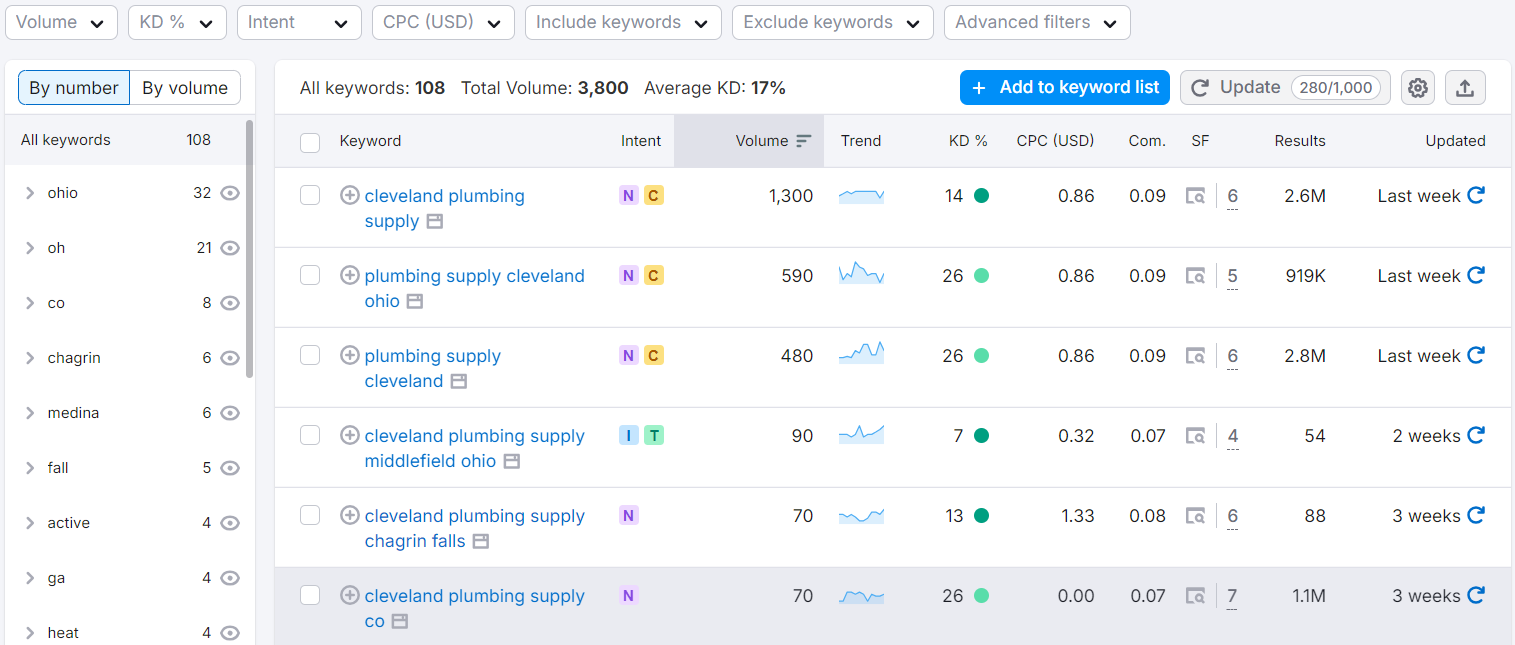
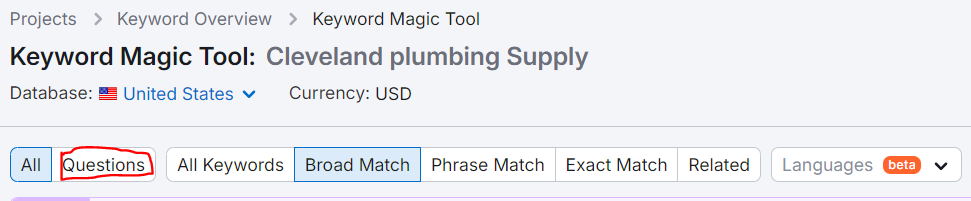
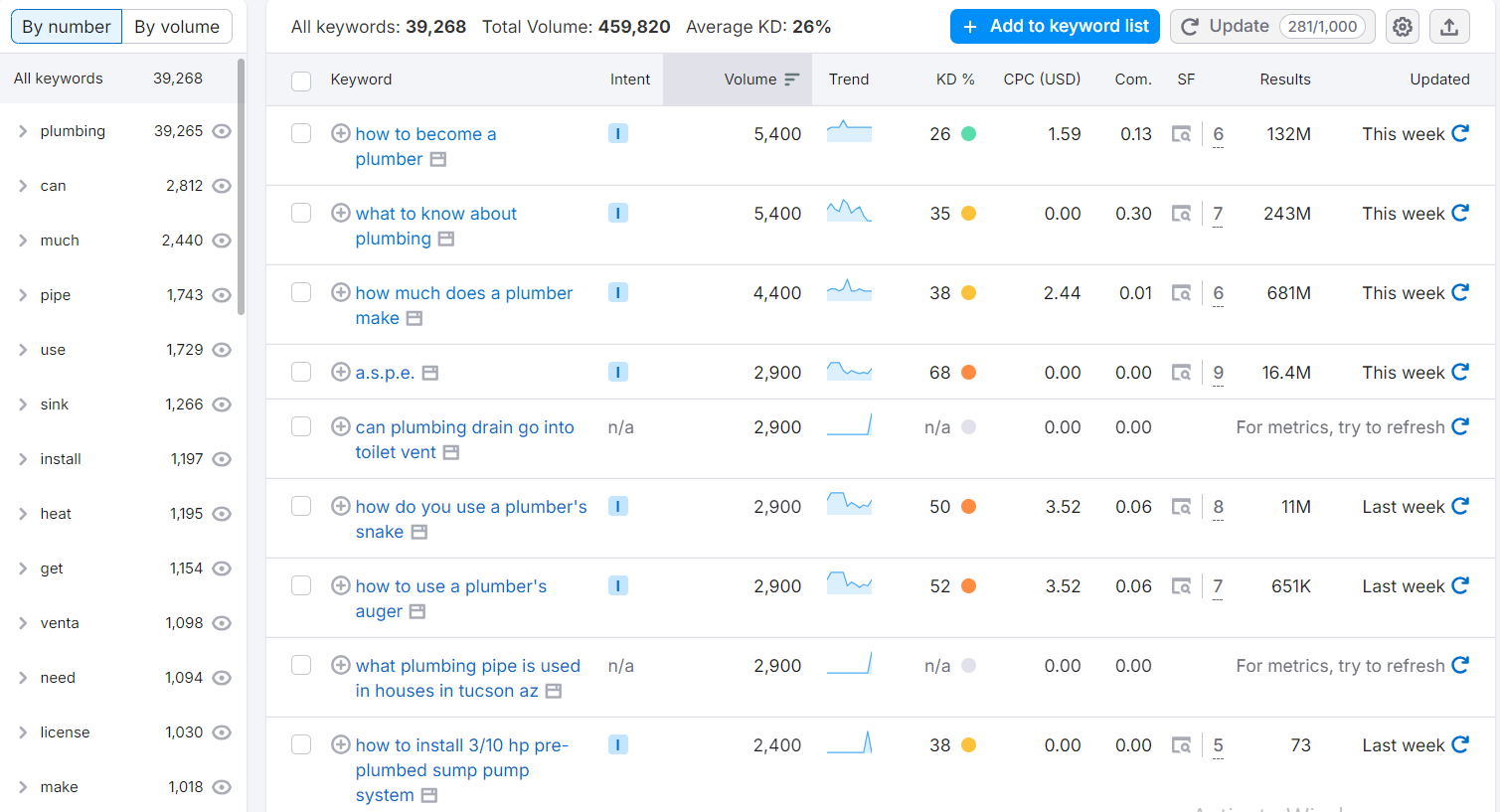
Filter the results based on metrics such as search volume, keyword difficulty, and more. This tool will generate a comprehensive list of related keywords, including variations and long-tail options. You can even sort keywords by questions, making it easier to address user queries in your blog posts.
Analyzing Competitor Keywords
Understanding what keywords your competitors are ranking for can provide valuable insights. To do this, follow these steps:
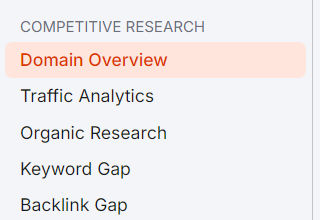
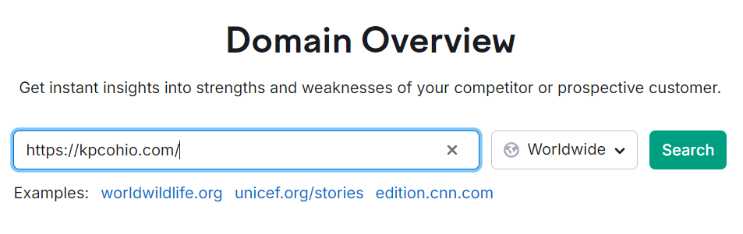
Go to the Domain Overview feature in SEMrush.
Enter a competitor’s domain into the search bar.
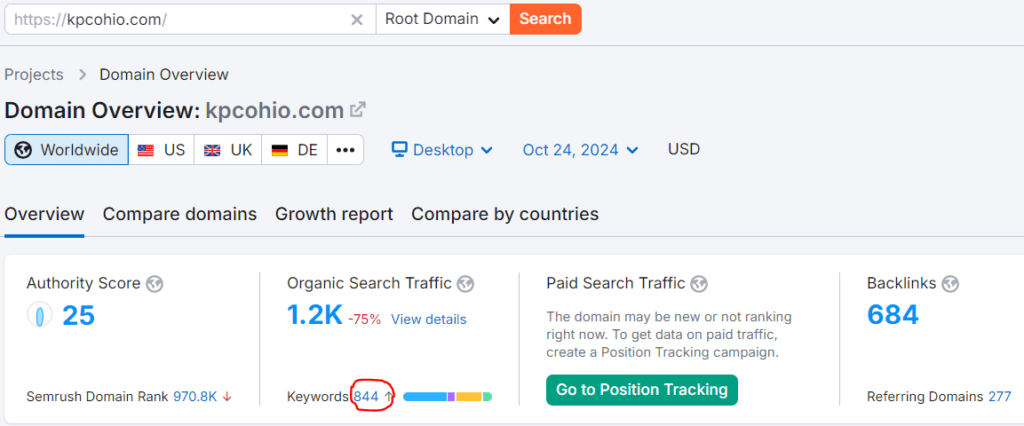
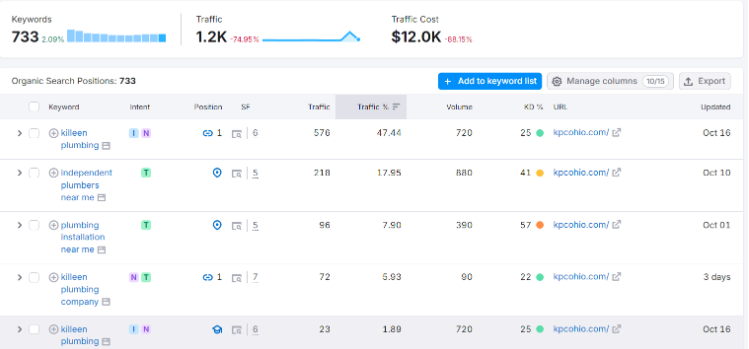
Review the keywords they rank for, along with their estimated traffic and position in search results. To see specific keywords, click on the number displayed in front of the keywords under the “Organic Search Traffic” section.
Select keywords that align with your business goals and services.
This analysis helps you identify potential gaps in your own keyword strategy and discover new opportunities for your blog.
Finding Keyword Ideas through Questions
User questions are a great source of content ideas. SEMrush allows you to find these queries easily:
Use the Keyword Magic Tool again, and filter for question-based keywords.
Explore the list of questions generated to find topics your audience is curious about.
Incorporating answers to these questions into your blog posts can enhance user engagement and improve your chances of ranking well in search results.
Evaluating and Selecting Keywords
Once you have a list of potential keywords, it’s time to evaluate them. Consider the following metrics:
Search Volume: Look for keywords with a decent search volume to ensure there’s interest.
Keyword Difficulty: Aim for keywords with lower difficulty, especially if your site is new or has lower authority.
Competitive Density: Higher density indicates a more competitive keyword, so balance your choices.
By prioritizing keywords based on these factors, you can focus on those that are most likely to drive traffic to your blog.
Creating a Keyword List in SEMrush
Finally, it’s essential to organize your chosen keywords for future reference. SEMrush allows you to compile a keyword list:
Create a new list in the Keyword Magic Tool or the Keyword Overview section.
Add your selected keywords to the list, categorizing them by topic or intent.
This organized list will serve as a roadmap for your blog content strategy, ensuring you target relevant keywords consistently.
Conclusion
Finding the right keywords for your business blog is essential for achieving online success. SEMrush is a powerful tool that streamlines the keyword research process, making it easier for you to discover valuable keywords. By following the steps outlined in this guide, you can enhance your blog’s visibility and attract more readers.
Ready to boost your blog traffic? Start your keyword research with SEMrush today, and watch your content rise in search engine rankings! If you need expert guidance on optimizing your blog or developing a content strategy, reach out to The Sun Media House. We’re here to help your business thrive online.
The digital landscape is abuzz with news of a significant legal battle brewing between WordPress and WP Engine. This conflict has not only captured the attention of the tech community but also raised important questions about the implications of such disputes on the open-source ecosystem. As we delve into the details, it becomes clear that the outcome could have far-reaching effects on the future of both companies and the WordPress community at large.
Background of the Dispute
The conflict began when WP Engine, a leading managed WordPress hosting provider, filed a lawsuit against WordPress, Automattic (the parent company of WordPress), and its co-founder and CEO, Matt Mullenweg. The lawsuit centers around allegations of trademark violations and claims that Mullenweg extorted money from WP Engine. In a Reddit post, Mullenweg claimed that WP Engine’s legal actions and public statements threaten the integrity of the WordPress community, portraying themselves as victims in a narrative that is still unfolding.
According to reports, WP Engine’s attorney has accused Mullenweg of attempting to secure a significant financial settlement before his keynote speech at the recent WordCamp US Convention. The attorney described this as a “covert demand” that placed undue pressure on the company, further alleging that Mullenweg’s conduct was “disgraceful” and intended to harm WP Engine’s business reputation within the WordPress ecosystem.
Key Allegations
Trademark Violations: WP Engine alleges that Automattic has infringed on its trademarks, which raises critical questions about brand identity and the ownership of key terms associated with the WordPress platform.
Extortion Claims: WP Engine’s legal team claims that Mullenweg made threatening statements, suggesting that if the company did not comply with his financial demands, he would adopt a “scorched earth” approach against them within the community. This assertion indicates a breakdown of trust and collaboration, which are vital to the success of open-source projects.
Public Statements: Mullenweg’s comments at the WordCamp US Convention have been described as misleading and damaging to WP Engine’s reputation, with the company arguing that these statements constituted actionable wrongdoing.
Implications for the WordPress Community
The ongoing dispute poses several challenges and concerns for the WordPress community:
Trust and Collaboration: Open-source projects thrive on collaboration and trust among contributors, developers, and companies. This legal conflict threatens to erode that trust, leading to a more fragmented community where companies may become wary of one another.
Innovation Stifling: Legal battles can divert attention and resources away from innovation and improvement. Instead of focusing on enhancing the platform and user experience, companies may allocate funds to legal defenses, which could stifle the creative process necessary for progress.
Brand Identity and Market Competition: The dispute brings to light the issues surrounding brand ownership and the use of terms integral to the WordPress ecosystem. As WP Engine and Automattic navigate this legal quagmire, the community must grapple with the implications of brand identity and market competition.
Potential for Precedent: The outcome of this case could set a significant precedent for future disputes involving trademark rights within the open-source community. Should WP Engine prevail, it may embolden other companies to pursue legal action in similar circumstances, further complicating the landscape for developers and businesses alike.
Community Reactions
The reactions from the WordPress community have been mixed, with some expressing support for Mullenweg and his vision for WordPress, while others have sided with WP Engine. The case has ignited passionate discussions across forums and social media platforms, reflecting the deep-seated loyalty many users feel toward the WordPress brand and the companies that support it.
Some community members argue that Mullenweg’s actions are necessary to protect the WordPress ecosystem from perceived threats. They contend that, as the co-founder of WordPress, Mullenweg has a responsibility to ensure that the platform remains accessible and beneficial to all users. Others view the lawsuit as an unnecessary escalation that could ultimately harm the community and its members.
Developers React to Plugin Changes
The recent decision by WordPress.org to take control of a major WP Engine plugin to “remove commercial upsells and address a security issue” has generated significant concern among developers. Matt Mullenweg, cofounder and CEO of Automattic, announced the update, now known as “Secure Custom Fields,” a fork of the Advanced Custom Fields (ACF) plugin.
While Mullenweg did not specify the details of the security issue, he cited point 18 of the plugin directory guidelines, which allows WordPress to modify or remove plugins without developer consent. This move comes in light of a lawsuit filed by WP Engine against Mullenweg and Automattic, further eroding trust within the developer community. (The verge)
As a result, many developers are feeling apprehensive, with some, including Bill Erickson, the creator of the Display Posts plugin, deciding to stop using WordPress.org for their updates. This development highlights a growing divide within the WordPress community, as developers consider the implications of these changes for their projects and the overall ecosystem. (Reddit)
What’s Next?
As the legal proceedings unfold, the WordPress community will be closely monitoring developments. Both parties have expressed their commitment to resolving the dispute, but the path forward remains uncertain. The potential for an out-of-court settlement exists, but if the case goes to trial, it could take months or even years to reach a resolution.
In the meantime, developers and users alike will be looking for guidance on how to navigate the implications of this dispute. The legal ramifications could affect everything from branding strategies to the way companies collaborate within the WordPress ecosystem.
Conclusion
The dispute between WordPress and WP Engine serves as a stark reminder of the challenges that can arise in the world of open-source software. As the community grapples with the implications of trademark rights and business ethics, it’s essential for all stakeholders to remain engaged and informed. Open dialogue and collaboration will be crucial in mitigating the impact of this dispute on the broader WordPress ecosystem.
As the situation develops, it is clear that the outcome will shape the future of both companies and potentially redefine the dynamics of the WordPress community. Stakeholders will need to navigate these challenges carefully, fostering an environment of trust and collaboration to ensure the ongoing success of WordPress as a leading platform for users and developers alike.
In the competitive world of online marketing, simply having a website isn’t enough, you need to make sure it can be found. This is where Search Engine Optimization (SEO) becomes essential. Effective SEO improves your site’s visibility in search engine results, driving more organic traffic and increasing your reach. While SEO might seem complex, the Yoast SEO plugin simplifies the process.
As one of the most widely-used SEO tools for WordPress, Yoast SEO offers user-friendly features that help you optimize your website effortlessly. Whether it’s improving your content’s readability, refining meta descriptions, or ensuring your site follows best SEO practices, Yoast provides valuable insights and real-time feedback to enhance your ranking.
In this guide, we’ll explore how you can leverage the Yoast SEO plugin to enhance your website’s SEO. By following these steps, you’ll be able to improve your content, make your site more search-engine-friendly, and ultimately attract more visitors.
1. Install and Configure the Yoast SEO Plugin
Before you can begin optimizing your site with the Yoast SEO plugin, you’ll need to install and configure it correctly. If you want access to extra features, you’ll need the paid version, available on the official Yoast website. For this guide, we’re using the free version. Follow these steps to get started:
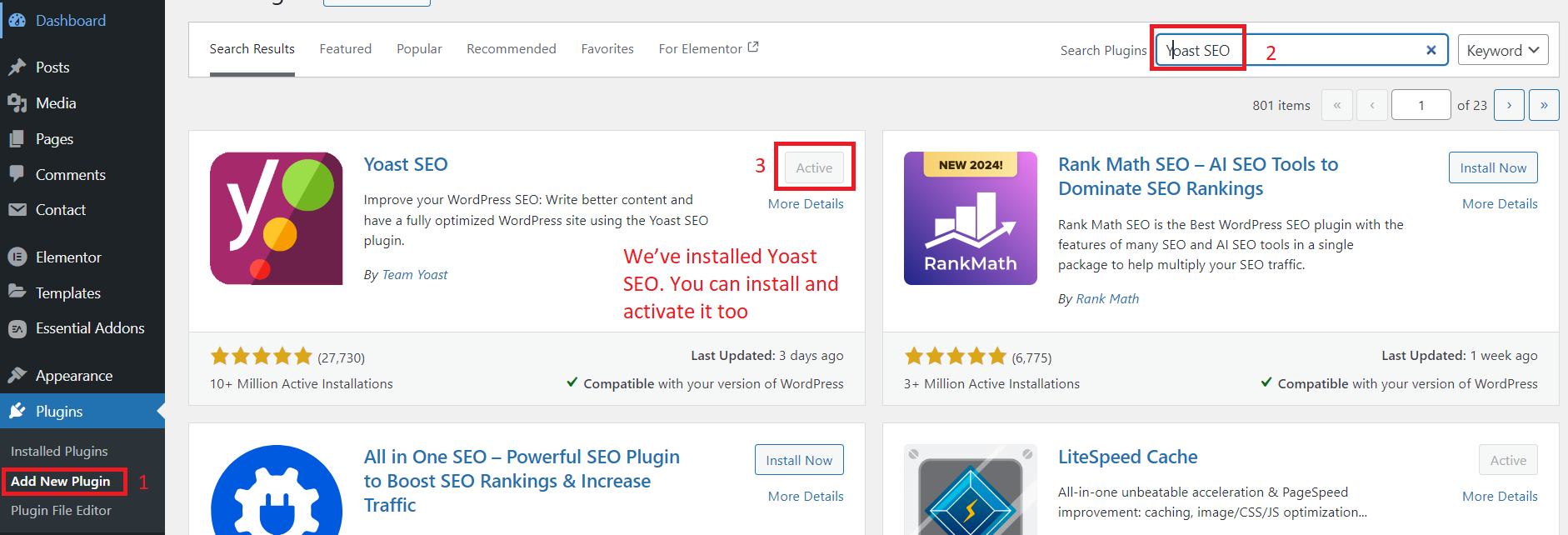
Step 1: Install Yoast SEO
In your WordPress dashboard, navigate to Plugins > Add New.
In the search bar, type Yoast SEO.
Once you find it, click Install Now and then Activate.
After activation, you’ll see a new menu item labeled SEO in your WordPress dashboard.
Step 2: Configure Yoast SEO
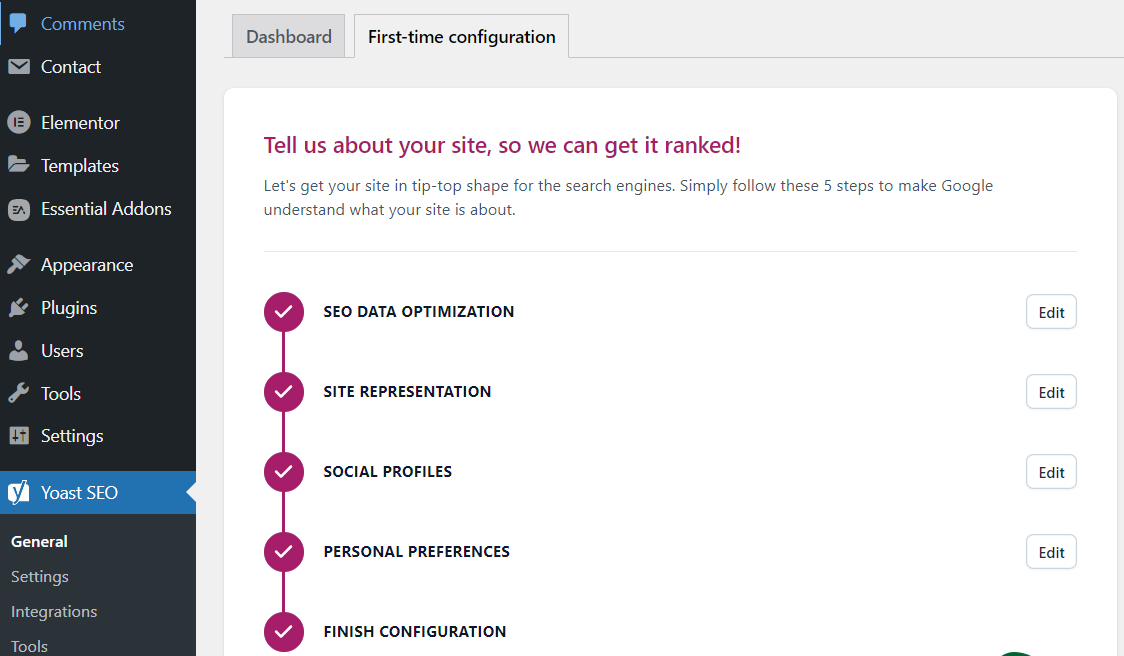
Yoast SEO offers a setup wizard that guides you through the basic configuration process. This is a great starting point if you’re new to SEO.
Click on SEO in your dashboard, and select General.
Go to the Configuration Wizard tab and click Open the Configuration Wizard.
The wizard will walk you through key settings such as:
Site Type: Define whether your site is a blog, online store, news site, or something else.
Organization/Person: Choose whether your website represents a business or an individual.
Search Engine Visibility: Ensure that you allow search engines to index your site.
Number of Authors: Indicate whether your site has multiple authors, which helps with author archives.
Step 3: Set Up XML Sitemaps
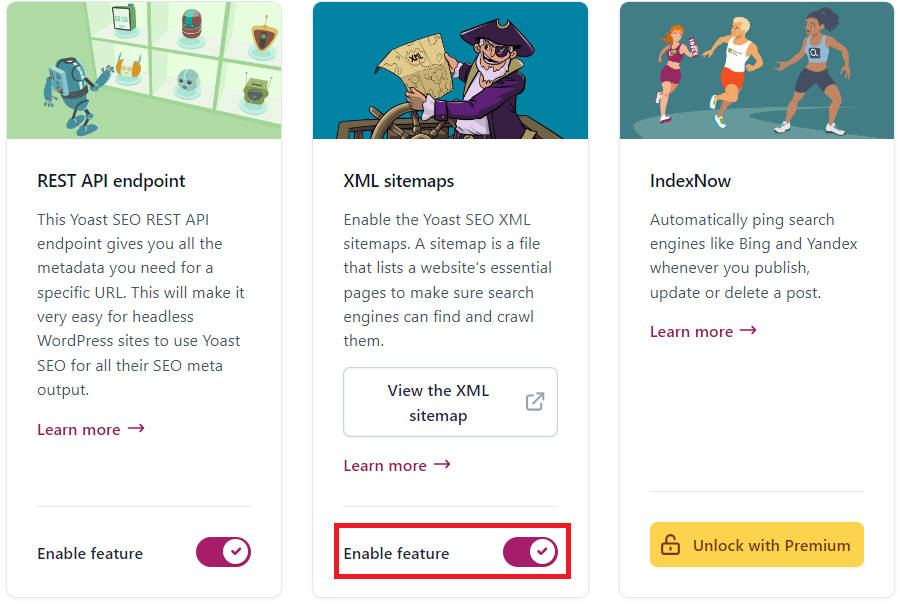
Yoast SEO automatically generates an XML sitemap for your website, which is essential for helping search engines like Google crawl and index your pages.
Go to SEO > General > Settings.
Ensure the XML Sitemaps option is turned on (it should be enabled by default).
You can view your sitemap by clicking the question mark next to this feature and selecting See the XML Sitemap.
Step 4: Connect to Google Search Console (Optional but Recommended)
Google Search Console allows you to monitor your website’s search performance. You can easily integrate it with Yoast SEO or you can integrate any other method as well.
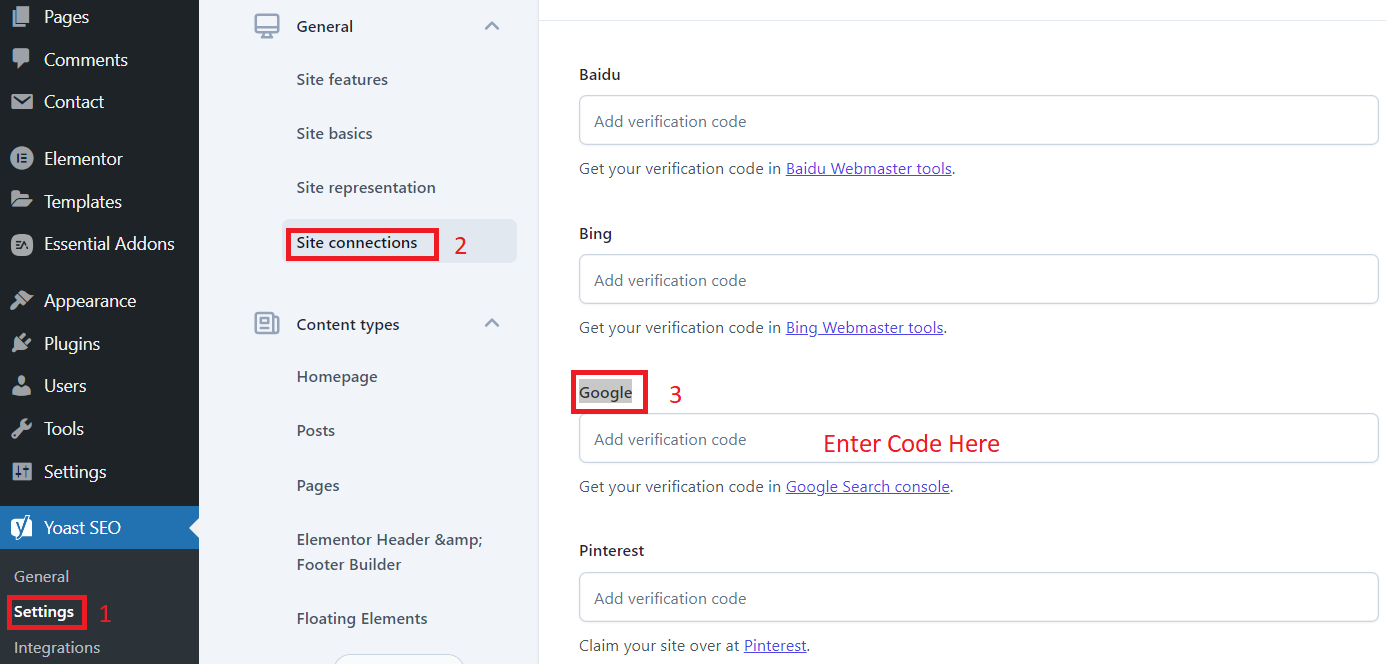
Go to SEO > Settings> Site connections> Google.
Enter your Google Search Console verification code to link your site and start tracking important SEO metrics.
By installing and configuring Yoast SEO, you’ve laid the foundation for a well-optimized website. The plugin’s automatic features, like the XML sitemap and Google integration, help search engines discover and index your content quickly and efficiently.
2. Optimize Your Content with Yoast SEO
One of the most powerful features of the Yoast SEO plugin is its ability to optimize your content for both search engines and readers. Here’s how to make the most out of its content optimization tools:
Step 1: Keyword Research and Focus Key phrase
Before optimizing, identify the focus keyword you want to rank for. This is the primary term people will search for to find your content. Use tools like Google Keyword Planner or Ubersuggest to find relevant keywords with good search volume and low competition.
How to Use the Focus Key phrase Feature:
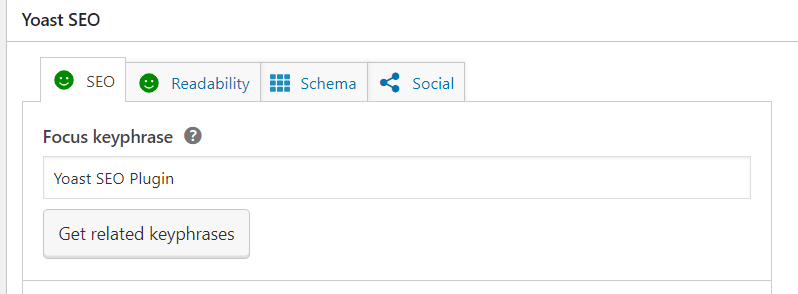
After writing your content, scroll down to the Yoast SEO box below the post or page editor.
In the Focus Key phrase field, enter the main keyword you want to target.
Yoast will analyze your content and provide feedback on how well your page is optimized for that keyword.
Step 2: Optimize Keyword Usage
Yoast will evaluate your content and show recommendations on where to improve keyword placement. To fully optimize your page, aim to include the focus key phrase in the following areas:
Page Title: Make sure your key phrase is in the title of your content.
Subheadings (H2, H3, etc.): Use the keyword in at least one subheading for better keyword distribution.
First Paragraph: Include your keyword naturally within the first 100 words.
Body Text: Ensure that your keyword appears throughout the body but avoid keyword stuffing. Yoast’s feedback will indicate whether your keyword density is too low or too high.
URL Slug: Your URL should be short and contain the key phrase.
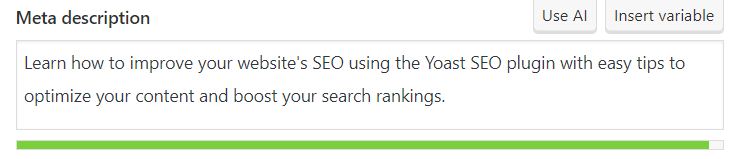
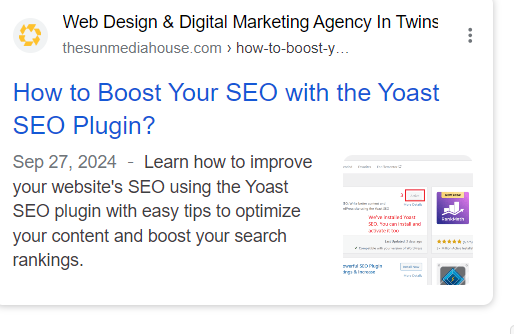
Meta Description: This is the snippet that appears in search engine results. Yoast allows you to customize it, and it’s crucial to include your focus keyword here to entice users to click.
Step 3: Utilize Synonyms and Related Keywords
In addition to your focus keyword, Yoast encourages the use of related keyphrases or synonyms. This makes your content more comprehensive and helps you rank for a broader set of search terms.
Scroll down to the Yoast SEO box and click the Related Keyphrase section (Optional Not Recommended).
Enter any relevant terms or variations of your focus key phrase. Yoast will analyze and provide feedback on the inclusion of these terms in your content.
Step 4: Readability Optimization
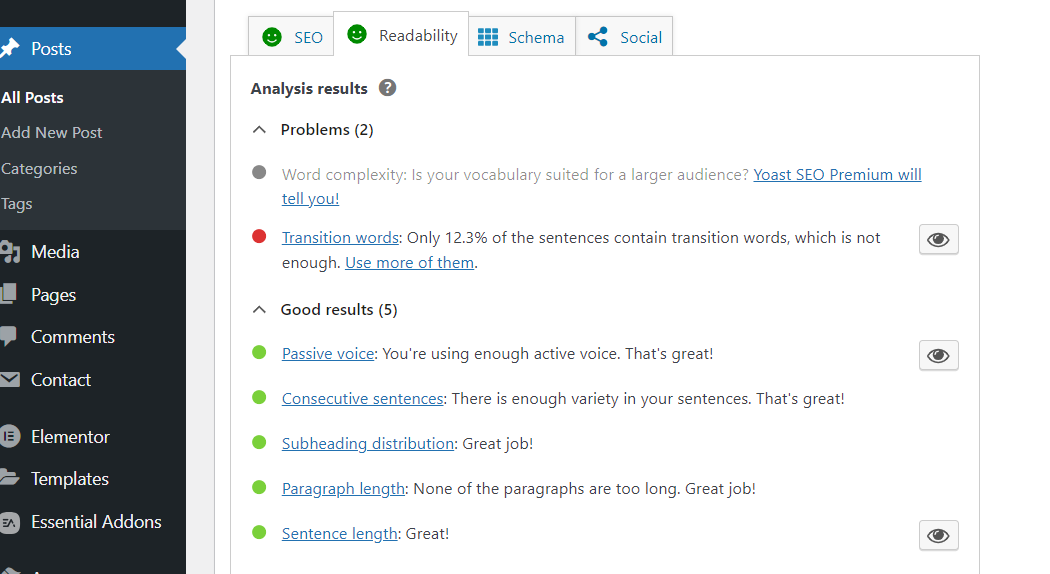
Yoast SEO doesn’t just analyze keywords, it also helps you ensure that your content is easy to read. Under the Readability tab, Yoast assesses:
Sentence Length: Avoid overly long sentences. Aim for a mix of shorter and medium-length sentences.
Paragraph Length: Break up long blocks of text to improve readability.
Transition Words: Use words like “however,” “therefore,” or “in addition” to create flow in your content.
Passive Voice: Minimize the use of passive voice to make your writing more engaging.
Each of these factors is rated, and Yoast provides tips for improving them. The goal is to make sure your content is both SEO-friendly and reader-friendly.
Step 5: Image SEO
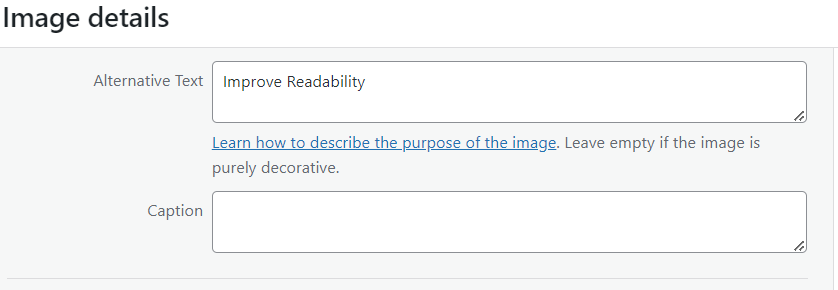
Images play a significant role in both user experience and SEO. Yoast helps ensure your images are optimized by reminding you to:Use Alt Text: Add descriptive alt text to every image, and where appropriate, include your focus keyword.
Optimize File Names: Use keyword-rich file names for images before uploading them to your site.
Step 6: Content Analysis Feedback
Once you’ve implemented Yoast’s suggestions, the plugin will give your page a score. It uses a simple color-coded system:
Green: Your content is well-optimized for SEO and readability.
Orange: There’s room for improvement.
Red: Significant SEO issues need to be addressed.
Pro Tip: Use Cornerstone Content
Yoast allows you to mark essential, long-form content as cornerstone content. These are the main articles or pages that provide the most comprehensive information on a topic, and they should be internally linked frequently.
To mark a piece as cornerstone content:
In the Yoast SEO box, under the Focus Key phrase section, check the Cornerstone Content box.
Make sure you link to this cornerstone content from other pages, increasing its internal SEO value.
3. Optimize Meta Tags
Meta tags play a crucial role in how search engines and users perceive your content. Yoast SEO helps you optimize these tags to improve your visibility in search results. Here’s how:
Step 1: Edit the SEO Title
Your SEO title is the clickable headline that appears in search results. It should be compelling and include your focus keyword.
Keep it under 60 characters so it doesn’t get cut off.
Make sure the keyword appears naturally, preferably toward the beginning.
To edit:
Scroll to the Yoast SEO box below your content editor.
In the SEO Title field, you can customize your title by typing directly or using Yoast’s placeholders.
Step 2: Customize the Meta Description
The meta description is the snippet of text shown under the title in search results. Though it doesn’t directly affect rankings, a well-written meta description can improve your click-through rate (CTR).
Keep it under 160 characters.
Include your focus keyword to show relevance to searchers.
Write a compelling summary that encourages users to click.
To edit:
In the Yoast SEO box, fill in the Meta Description field with a concise, keyword-rich summary.
Step 3: Optimize the Slug (URL)
The slug is the part of the URL that comes after your domain name. A clean, concise slug that includes your keyword helps both search engines and users understand what the page is about.
Keep it short and relevant.
Avoid unnecessary words (e.g., “the,” “and”).
Include your focus keyword.
To edit:
Look at the URL Slug section in the Yoast SEO box and adjust the text to reflect your keyword.
Step 4: Preview Your Snippet
Yoast SEO provides a preview of how your title, meta description, and URL will look in search results. Use this to check if everything fits and appears well-structured.
Set Up a Solid Internal Linking Strategy
Internal linking helps guide users through your site and improves SEO. Here’s how to use Yoast SEO for an effective internal linking strategy:
Add Relevant Links: Link to related content within your site. Use descriptive anchor text that clearly indicates what the linked page is about.
Use Cornerstone Content: Mark key articles as cornerstone content in Yoast. These are your main, in-depth pieces that deserve more internal links.
Maintain Clear Structure: Ensure your links create a logical flow. Link more frequently to important pages and keep less critical pages linked less often.
Check for Broken Links: Regularly look for and fix any broken internal links. This keeps your site user-friendly and helps with SEO.
5. Utilize Schema Markup and Rich Snippets
Schema markup helps search engines better understand your content, and rich snippets display enhanced information in search results, such as ratings, prices, and FAQs. With Yoast SEO, you can easily add schema markup to your pages without coding.
Yoast automatically includes essential schema data for posts and pages. To further customize it, simply:
Go to the “SEO” section in your WordPress dashboard.
Under “Search Appearance,” configure how you want your content to appear in rich results.
For specific content types, choose from Article, FAQ, How-to, and more.
Using schema markup improves visibility in search results, driving more clicks to your site by enhancing how your content is presented.
Conclusion
Optimizing your website with the Yoast SEO plugin is a powerful way to improve your search engine rankings and enhance user experience. By focusing on content optimization, readability, meta tags, internal linking, and schema markup, you can create a site that not only attracts visitors but also keeps them engaged.
If you’re looking for expert guidance in enhancing your online presence, The Sun Media House is here to help. Our team specializes in SEO strategies tailored to your needs, ensuring that your website stands out in the crowded digital landscape. Contact us today to get started on your journey to better visibility and success!
Imagine you’ve just opened a cozy little café in your neighborhood. You’ve put a lot of love into your recipes and décor, and your first customers are enjoying your delicious treats. But there’s one thing missing: many people still don’t know about your café!
That’s where a website comes in. Think of your website as an online version of your café, where people can learn about your menu, see your hours, and find out what makes your café special, all from their computers or phones.
Building a website might sound complicated, but with WordPress, it’s surprisingly simple. WordPress helps you create a professional-looking website without needing any technical skills. In this guide, I’ll show you how to set up your small business website with WordPress, step-by-step. We’ll cover everything from picking a domain name to launching your site.
By the end, you’ll have a fantastic website that helps more people discover your café and keeps your business growing.
Step 1: Plan Your Website
Planning is the foundation of a successful website. Begin by identifying what you want your website to accomplish, such as attracting more customers, providing information, or selling products.
Next, think about your target audience and what they need. Tailoring your content to their interests will make your site more appealing. Outline the key pages you’ll need, like Home, About Us, Services, and Contact, and create a simple site map to organize these ideas.
Finally, choose a design that reflects your brand’s identity, including colors, fonts, and images. This thoughtful planning will ensure your website effectively meets your goals and engages your visitors.
Step 2: Choose a Domain Name and Hosting
To get your website online, you need to pick a domain name and choose a hosting service.
First, choose a domain name that represents your business and is easy to remember. It should be short and relevant to what you do. After deciding on a domain name, register it with a domain registrar like Namecheap, which is known for its affordable and reliable services.
Next, select a hosting provider to store your website files and make your site available on the internet. For small businesses, Namecheap or Hostinger is a great option. It offers budget-friendly hosting plans with excellent performance and customer support.
Once you’ve registered your domain and set up hosting, connect to them so your website can go live. This will set the stage for building and launching your site.
Step 3: Install WordPress
Now that you’ve registered your domain and set up your hosting, it’s time to install WordPress.
Since we’re using Namecheap hosting for this tutorial, here’s how to get started. First, log into your Namecheap account and open your hosting control panel, also known as cPanel. If you’re using a different hosting provider, the process will be similar, but the interface might look slightly different.
Once in cPanel, find the section called “Softaculous Apps Installer” or “WordPress Tools”, this is where you can install WordPress easily.
Click on the WordPress icon, and it will guide you through the installation steps.
Choose your domain: Select the domain where you want to install WordPress (the one you registered earlier).
Fill in site details: Add a site name and description. These can be changed later, so don’t worry if you’re not sure yet.
Create login details: Set up your admin username, password, and email address. Be sure to choose a strong password to keep your site secure.
Install WordPress: Once everything is filled in, click Install. The process will take a few moments.
After WordPress is installed, you’ll get a link to your website’s admin dashboard, where you can start customizing and building your site.
Step 4: Choose and Customize Your Theme
Now that WordPress is installed, it’s time to make your website look great by choosing a theme. A theme controls the overall design and layout of your site, and one of the best options for small business websites is the Astra theme.
For this tutorial, we’ll be using Astra along with its plugin called Starter Templates to help you quickly set up a professional-looking website.
Install the Astra Theme:
From your WordPress dashboard, go to Appearance > Themes.
Click on the Add New button at the top.
In the search bar, type Astra and then click Install when you find it.
After installation, click Activate to apply the theme to your website.
Install the Starter Templates Plugin:
After activating the Astra theme, you’ll see a prompt recommending the Starter Templates plugin.
Click on Get Started or go to Plugins > Add New, then search for Starter Templates.
Click Install and then Activate.
Choose a Template:
With the Starter Templates plugin active, go to Appearance > Starter Templates.
Here, you can browse a variety of pre-built website templates designed for different industries.
Choose a template that matches your business and click Import Complete Site to load all the pages and settings.
Customize Your Site:
Now that the template is installed, you can customize it to fit your brand.
Go to Appearance > Customize to edit the logo, colors, fonts, and layout.
You can also go to individual pages and update the content with your own text, images, and links by using the block editor or a page builder like Elementor, depending on the template you chose.
Astra and Starter Templates make it easy to create a professional site quickly, with plenty of customization options to make it your own. Once you’ve made your changes, click Publish to save your customizations and bring your website to life.
Step 5: Add Essential Pages and Content
Now that your theme is ready, it’s time to add important pages and content to your site. Here are the key pages every small business website should have:
Home Page: The main page where you introduce your business with a strong headline and clear call-to-action buttons.
About Us Page: Share your story, what your business does, and what makes it unique.
Services/Products Page: Display your services or products with descriptions and images. Make it easy for visitors to learn more or buy.
Contact Page: Provide your address, phone number, email, and a contact form so visitors can reach you easily.
Blog (Optional): Share updates, tips, or industry news to engage customers and improve SEO.
Privacy Policy and Terms (Optional): Important if you collect any customer data.
Once you’ve added these pages, start filling them with content that’s simple, clear, and aligns with your brand.
Step 6: Install and Configure Plugins
Plugins are like apps for your WordPress site. They add features and functionality, making your website more powerful. Here’s how to install and configure essential plugins:
Install Plugins:
From your WordPress dashboard, go to Plugins > Add New.
Use the search bar to find the plugins you need.
Click Install Now, then Activate once the plugin is installed.
Essential Plugins to Consider:
Yoast SEO: Helps optimize your content for search engines so more people can find your site.
Wordfence Security: Protects your website from hackers and malware.
WPForms: Allows you to easily add contact forms to your site.
Smush: Compresses images to make your site load faster.
WooCommerce: If you’re selling products, this plugin helps you set up an online store.
Configure Plugins:
After installation, each plugin will have its own settings. Go to the plugin’s settings page (usually found under Settings or in its own menu item) and follow the prompts to configure it according to your needs.
By adding and configuring plugins, you can enhance your website’s performance, security, and usability.
Conclusion
Creating a small business website with WordPress is a straightforward process when you take it step by step. By carefully planning your site, choosing the right domain name and hosting provider, installing WordPress, and customizing your theme, you’re laying a strong foundation for your business’s online presence. Adding essential pages such as Home, About, Services, and Contact, and configuring important plugins, will enhance the functionality and user experience of your website.
A well-designed website is more than just a digital space; it’s a tool that helps you connect with your customers, showcase your products or services, and grow your business. However, as easy as WordPress is to use, building a professional, high-performing site can still be overwhelming, especially if you’re focused on running your business.
That’s where The Sun Media House can help. With our team of experts, we offer personalized guidance and tailored solutions to ensure your website not only looks great but also performs at its best. Whether you need help with design, content, SEO, or digital marketing, we are here to assist. Let us help you turn your vision into a website that drives success.